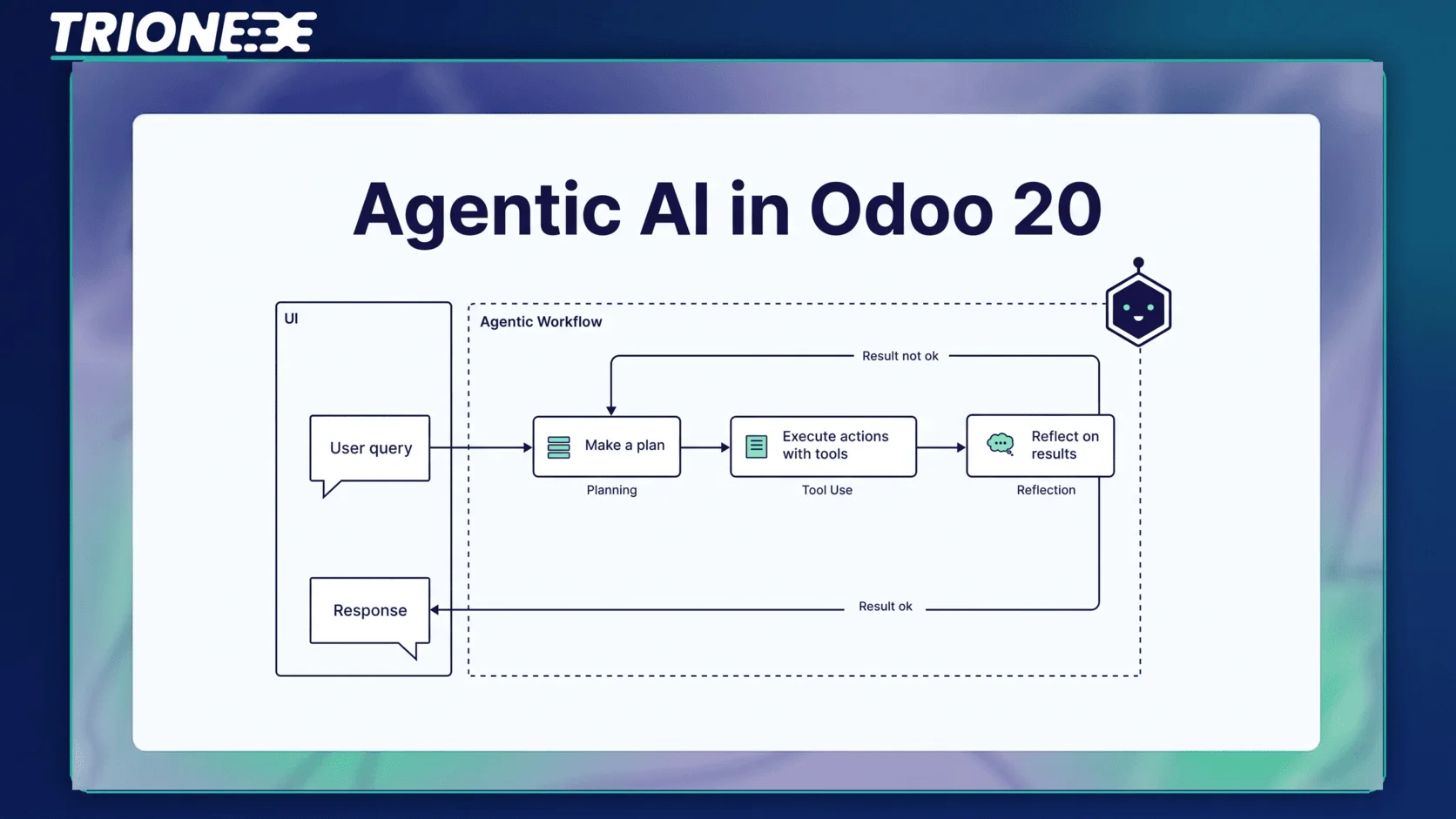
A closer look at Odoo’s shift from AI that answers questions to AI that takes action on its own.
A supplier’s shipment runs two weeks late. In most ERPs, someone notices the gap on a stock report, checks the purchase order history, and manually raises a new one. In Odoo 20, an AI agent watching that same inventory data can flag the delay, compare it against demand patterns, and create the replacement purchase order before a human ever opens the screen. That difference — from reporting a problem to solving it — is what “agentic AI” means in practice.
Agents Already Exist in Odoo. Odoo 20 Changes What They Do
Odoo’s AI application isn’t brand new. Recent versions already let businesses build AI agents with a defined role, a system prompt, and a set of tools they’re allowed to use. Each agent is built from two pieces: topics, which tell the agent what tasks it’s responsible for, and sources, which give it the records and documents it needs to do that work. Tools get attached to topics so the agent has a way to actually act — creating a record, updating a field, sending a message.
What’s changed in Odoo 20 is the trigger. Earlier versions needed a person to start the conversation: you typed a question into “Ask AI” or asked an agent to handle a specific task, and it responded. Odoo 20 pushes agents toward working proactively — watching a process in the background and acting when conditions are met, not just when someone asks.
What “Agentic” Actually Means Here
It helps to separate three levels of AI that often get lumped together:
- Generative AI writes or summarizes content when you ask it to — a product description, a reply draft, a report.
- Reactive AI agents (what Odoo 19 introduced) complete a task when given an instruction, but stop and wait once it’s done.
- Agentic AI holds a goal rather than a single instruction. It monitors data, decides when something needs attention, and carries out the next step itself, inside boundaries someone has already set.
Odoo 20 is built around that third category. The agent isn’t smarter in a general sense — it’s given more autonomy to act within a scope a business defines up front.
What This Looks Like in Real Workflows
Three examples show the shift clearly, and each one maps to a workflow teams already run manually today.
Sales
Autonomous lead qualification and follow-up
- A new inquiry lands in the CRM pipeline.
- The agent scores the lead against past conversion data and pulls relevant company details.
- It sends a personalized first response and books a meeting slot directly on the calendar.
- If the lead goes quiet, the agent re-engages later with context from the earlier exchange, instead of sending a generic nudge.
The sales team steps in once a lead is qualified and ready for a real conversation, rather than spending the morning triaging new inquiries.
Inventory & Procurement
Stock monitoring that acts before a shortage happens
- The agent tracks stock levels, supplier lead times, and demand trends across SKUs.
- When a threshold is crossed, it raises a purchase order automatically instead of waiting for a manual reorder point check.
- If a supplier is running late, it flags the delay and suggests an alternative source based on past performance.
A warehouse manager reviewing stock at the end of the week finds the gap already covered rather than discovering it after a stockout.
Customer Support
Ticket handling with real context
- An agent reads an incoming ticket and pulls the customer’s order, invoice, and past ticket history.
- Routine requests — order status, password resets, refunds under a set threshold — get resolved without a human touching them.
- Anything more complex gets escalated to a person, along with a full summary so nobody starts from zero.
Businesses that have leaned on a best Odoo partner in Pakistan to configure their CRM and inventory modules already have most of the groundwork these agents need — clean data structures and consistent workflows are what make autonomous action reliable rather than risky.
Why Autonomy Needs Guardrails, Not Just Permission
Letting an agent act on its own raises an obvious question: how far should it go without a person checking in first? Odoo’s agent structure answers this by scoping each agent to specific topics and tools rather than giving it open access to the database. A support agent can resolve a refund under a set amount but can’t approve one above it. A procurement agent can raise a purchase order within an approved supplier list but can’t add a new vendor on its own.
This is where implementation quality matters more than it did with earlier, purely reactive AI features. A poorly scoped agent doesn’t just give a bad answer — it takes a real action inside your data. Getting the topics, sources, and tools configured correctly the first time is the difference between an agent that saves hours every week and one that creates cleanup work.
Getting Ready to Use It
- Start with one workflow, not five. Pick the process with the clearest rules — inventory reordering and routine support tickets are usually the easiest starting points.
- Clean up the data the agent will read from. An agent making decisions off inconsistent stock counts or duplicate customer records will make inconsistent decisions.
- Set explicit limits before turning it on. Decide the dollar thresholds, approval rules, and escalation paths in advance rather than adjusting them after something goes wrong.
- Review agent activity regularly, especially early on. Treat the first few weeks like onboarding a new team member — check its decisions until you trust the pattern.
Teams that already work with expert Odoo partners for their day-to-day Odoo support are in a good position here — scoping an agent correctly draws on the same process knowledge an implementation partner already has about how each department actually works.
The Practical Takeaway
Agentic AI in Odoo 20 isn’t about replacing the sales rep, the warehouse manager, or the support agent. It’s about removing the routine decisions that don’t need a human in the loop — a delayed shipment, a cold lead, a password reset — so people spend their time on the parts of the job that actually need judgment. The businesses that get the most out of it will be the ones that configure it carefully rather than turn every module loose on day one, and that’s usually easier with a expert Odoo partner in Pakistan like Trionex who sets the boundaries from the start.
Tagged with :