An Odoo Lite User (also written “Light User”) is a reduced-cost Odoo licence for people who need to exist in your system but do not run the business inside it.
It covers two situations. First, an employee who has an HR record and no login at all. Second, an employee who logs in but is restricted to self-service functions: their own profile, time off, expenses, appraisals, referrals, meal tracking and attendance, their planning shifts and worksheets, read-only access to Knowledge, connecting as an employee in a Point of Sale session, and barcode scanning in the warehouse.
A Lite User cannot open Sales, Purchase, Project or Accounting, and cannot use features reserved for Standard or Custom users.
The practical effect is a change in arithmetic. In a company of300 people where 25 actually create quotations, purchase orders and invoices, 275 people no longer need a full seat. For labour-intensive Pakistani businesses — textile units in Faisalabad, retail chains in Karachi, distribution networks in Lahore, hospitals in Islamabad, contractors anywhere — that is often the difference between an ERP budget that works and one that does not.
Odoo does not bill you for employees. It bills you for seats — internal users who can log in and work in applications. This single fact drives most of what companies get wrong about ERP cost.
What is an Odoo Lite User?
A warehouse picker, a machine operator, a shop cashier and a finance controller all appear in the same Employees list. Historically, if any of them needed to touch the system, the standard answer was a full internal user licence. In a 40-person office that is manageable. In a 400-person factory it is not, and it is the reason a large number of Pakistani mid-market companies price Odoo, blanch, and go back to spreadsheets.
The Lite User tier exists to break that link between headcount and licence count. It recognises that most people in a labour-intensive business consume the system rather than operate it. They submit a leave request. They punch in. They scan a box. They look at a shift roster. None of those actions require the ability to create a sales order or post a journal entry, and none of them should be priced as if they did.
So Odoo splits the population into tiers. Employees who never log in cost nothing. Employees who log in only for self-service and a narrow set of floor operations sit on a Litelicence. People who create, approve, report on or configure business transactions sit on a full Standard or Custom licence. Customers, suppliers and subcontractors sit outside on free Portal access.
Your job during implementation is to put every single person in the correct tier — and to resist the pull toward “give them all full access, we’ll sort it out later”, which is how a 30-seat quotation becomes a 300-seat invoice.
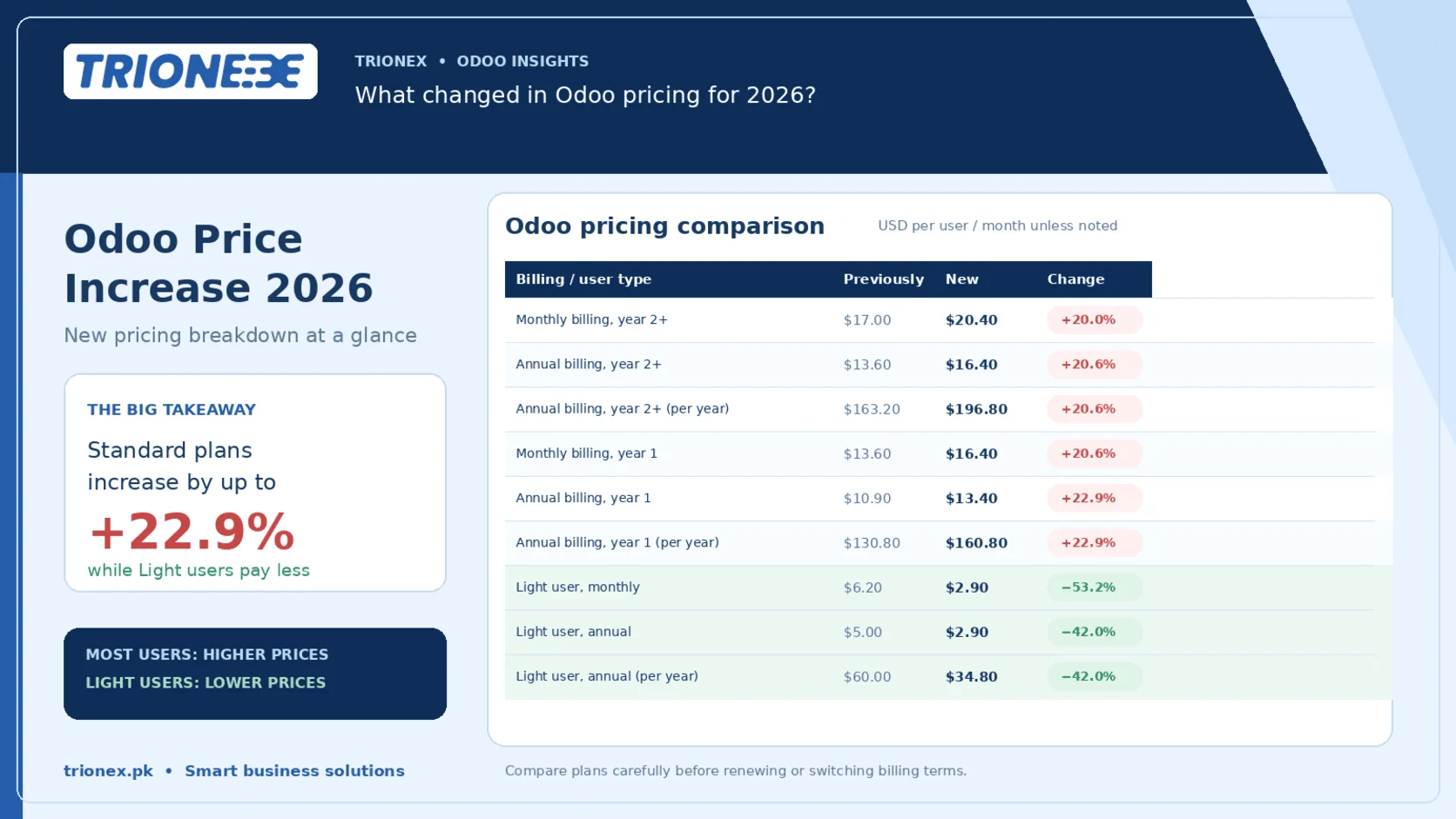
A note on currency and current terms. Licence names, inclusions and per-seat pricing change between Odooreleases, and Odoo prices in USD or EUR with local reseller arrangements varying. This guide describes how the tiers work, not what they cost this month. Confirm current rates on Odoo’s official pricing page or with your Odoo partner before you build a budget.
The two roles a Lite User plays
The term covers two genuinely different things. Mixing them up is the most common source of confusion in scoping calls, so it is worth being precise.
Role 1 — An employee with no application access
This person exists in the database purely as an HR record. No username, no password, no login screen, no application access whatsoever. They are data, not a user.
- They still do real work in your system, but other people do it on their behalf:
- They appear in the Employees directory, the org chart and the departmental structure.
- Their contract, salary structure, bank details and documents are held against them.
- Payroll runs on them.
- Attendance can be recorded against them by a kiosk, a biometric device or a supervisor.
- Timesheets and manufacturing work orders can be assigned to them by a planner.
- They can be selected as the cashier on a Point of Sale receipt, or the driver on a delivery.
- Leave balances accrue to them; an HR officer enters the requests.
For the majority of floor staff in a manufacturing or construction business, this is the correct configuration. A stitching operator does not need a login. She needs to be on the payroll, on the attendance register, and assignable to a work centre.
Role 2 — A user with limited access
This person does log in, but the system deliberately narrows what they can reach. They get a credential and a restricted menu: their own HR self-service, their shifts, and — where the business needs it — a small set of operational actions such as scanning at a barcode terminal or opening a POS session as an employee.
They are a user. They just are not an operator of the business.
The distinction that matters: a Lite User submits, they do not decide. They file a leave request; a manager approves it. They file an expense; finance approves it. They scan a transfer; a stock manager configured the operation type. Every approval, configuration and reporting right stays with a full user.
That is not a limitation to work around. It is the internal control that makes the tier safe to hand out at scale.
Exactly what a Lite User can access
When you do grant login access, the scope is fixed and narrow. Five areas, nothing else.
| Area | What a Lite User can do | What stays out of reach |
| HR and personal | Maintain their own profile, submit and track time off, file expense reports, submit candidate referrals, complete appraisal forms, order and track meals, check in and out for attendance | Other people’s records, approvals, payroll configuration, contracts, salary data |
| Planning | View their own planning and assigned shifts, open and complete worksheets | Creating or publishing schedules, assigning other people, planning configuration |
| Point of Sale | Connect as an employee in an open POS session and ring up sales under their own identity | Configuring POS, opening or closing sessions as a manager, pricing, discounts beyond policy, POS reporting |
| Knowledge | Read articles shared with them — documentation, SOPs, policies, checklists | Creating, editing or restructuring articles |
| Logistics and warehousing | Perform barcode scanning operations: picking, receipts, internal transfers, packing | Creating products, adjusting inventory, configuring operation types, warehouse or routing setup |
Two of these deserve extra attention, because they are where the tier earns its money.
Barcode without inventory rights is the one that surprises people. A picker can walk the aisles, scan a transfer, confirm quantities and close the operation — while being structurally incapable of creating a product, running a stock adjustment or touching a warehouse rule. Your inventory data stays clean because the people handling boxes can only do the thing they are standing there to do.
POS employee login means a retail chain can put every cashier in the system under their own identity — so sales, shifts and cash handling are attributable per person — without buying a full seat for every till. For a chain running eight outlets with five cashiers each, that is forty people who become traceable at Lite cost instead of forty full licences.
Note that the Lite scope is defined by the licence tier, not only by the access-rights checkboxes. Granting an application outside this list does not quietly extend the tier; it moves the person into a billable full-user category. That mechanism is deliberate, and it is the single most expensive thing to discover after go-live rather than before.
Exactly what a Lite User cannot do
The restrictions are strict by design, and they are not negotiable through clever configuration.
A Lite User has no access to core operational business applications:
- Sales — no quotations, no sales orders, no customer pricing, no pipeline
- Purchase — no requests for quotation, no purchase orders, no vendor management
- Project — no tasks, no project planning, no project timesheeting beyond their own worksheets
- Accounting — no invoices, no bills, no journal entries, no payments, no reconciliation, no tax filing
They also have no access to advanced features reserved for Standard or Custom users: Studio customisation, developer mode, external API access, custom app development, and the deeper reporting and analytics layers.
And within the areas they can reach, their rights stop at their own record. A Lite User sees their own leave balance, not the department’s. Their own expenses, not the team’s. Their own shifts, not the roster.
This is the part worth explaining carefully to a client before signing, because it sets the boundary of the design. If your storekeeper needs to create products, he is not a Lite User. If your supervisor needs to approve his team’s overtime, he is not a Lite User. If your outlet manager needs to see daily sales by product, she is not a Lite User.
The question is never “can we squeeze this person into Lite?” It is “what does this person actually need to do, and which tier is that?” Squeezing someone into the wrong tier produces one of two outcomes: a person who cannot do their job, or a workaround where five people share one full login — which destroys your audit trail and is usually a licence violation besides.
Lite User vs every other user type in Odoo
There are five distinct identities a person can hold in an Odoodatabase. Getting this table right at design time is worth more than any other single decision in an implementation.
| Identity | Who it is for | Can log in | Typical cost | Representative access |
| Employee record only | Floor staff, labour, drivers, anyone managed in HR but never at a screen | No | None — not a billable seat | Exists for payroll, attendance, assignment, org chart |
| Portal User | External parties: customers, suppliers, subcontractors, students, patients | Yes, to the portal only | Free | Their own quotations, invoices, tickets, deliveries, shared project items |
| Lite User | Internal staff needing self-service plus narrow floor operations | Yes, restricted | Reduced per-seat rate | Own HR self-service, planning and worksheets, POS employee login, read-only Knowledge, barcode operations |
| Standard User | People who run the business: sales, purchasing, stores, accounts, project leads, managers | Yes | Full per-seat rate | Any standard application their access rights allow, including approvals and reporting |
| Custom User | Organisations needing Studio, custom modules, external API or developer-level work | Yes | Highest per-seat rate | Everything a Standard User has, plus customisation and integration capability |
The confusion that costs the most: Lite vs Portal
These sound similar and are not remotely the same thing.
A Portal User is external. It is how your customer in Sialkot checks their outstanding invoices, or how your fabric supplier sees the purchase orders you raised against them. Portal access is free and unlimited, and it is criminally underused in Pakistani implementations — a huge amount of the WhatsApp traffic between a company and its customers is portal functionality nobody switched on.
A Lite User is internal. It is your own employee, on your payroll, inside your building, doing a restricted job in your system.
If you find yourself about to create a Lite User for someone who does not receive a salary from you, stop. That person is a Portal User, and they cost nothing.
The licensing math, and why it hits Pakistan differently
Per-seat licensing was designed for economies where a business’s headcount roughly tracks its revenue. Pakistan is not that economy.
Our competitive advantage is labour. A textile unit in Faisalabad, a surgical instruments manufacturer in Sialkot, a sports goods exporter, a leather tannery, a rice processing plant, a distribution house running 200 order bookers — these businesses employ large numbers of people to produce moderate revenue. Revenue per employee is a fraction of what a European or Gulf business generates from the same headcount.
Now apply a per-seat licence billed in foreign currency to that structure. The cost scales with your headcount. The revenue does not. And the PKR exchange rate moves against you between the quotation and the second renewal.
This is the actual reason so many Pakistani ERP evaluations stall. Not features. Not implementation capability. Arithmetic.
What the Lite tier changes
The correct way to size an Odoo deployment is not headcount. It is transaction-touching headcount — the number of people who create, approve or report on business documents.
That number is remarkably stable across company sizes. In most operating businesses it lands somewhere between 5% and 20% of total staff, regardless of whether you employ 80 people or 800. Everyone else is producing, moving, selling at a counter, or being managed.
So the sizing question becomes three counts, not one:
1. How many people create, approve or analyse business documents? → Standard or Custom seats
2. How many people need to log in only for self-service or floor operations? → Lite seats
3. How many people simply need to exist for HR, payroll and assignment? → Free employee records
Run that count honestly on a 300-person manufacturer and the typical answer is something like 25 full seats, 60 Lite seats and 215 free records. You have removed 92% of your headcount from the full-seat line. That is not a discount you negotiated. It is a licence structure you designed.
The unglamorous benefit nobody sells you on
There is a second effect that is worth as much as the money, and it takes eighteen months to appreciate.
A database where 275 people have full access is a database where your product master, your customer list and your stock counts will be wrong within a year. Not through malice — through a thousand small accidents. Someone creates a duplicate product because search did not find the original. Someone adjusts a stock quantity to make a count reconcile. Someone edits a customer’s payment terms.
Structural restriction is better data governance than any training programme, because it does not depend on anyone remembering anything. The Lite tier gives you that restriction as a side effect of the cheaper licence. You were going to want it anyway.
How this plays out, sector by sector
These are typical structures for Pakistani businesses, not audited case data. Your own split will differ, but the shape rarely does.
| Sector | Full seats (Standard or Custom) | Lite seats | Employee records, no login |
| Textile manufacturing, Faisalabad | Merchandisers, production planners, store in-charge, costing, accounts, export documentation | Line supervisors on planning and worksheets, store staff on barcode, HR self-service for permanent staff | Stitching, weaving, dyeing and finishing operators on payroll and attendance |
| Retail chain, Karachi | Category and purchasing team, outlet managers, warehouse manager, accounts | Cashiers connecting as employees in POS sessions, floor staff on attendance and shifts | Cleaning, security and support staff on payroll |
| FMCG distribution, Lahore | Order desk, credit control, warehouse manager, accounts, area managers | Pickers and loaders on barcode operations, delivery staff on attendance and shifts | Contract labour on payroll |
| Hospital or clinic group, Islamabad | Billing, pharmacy purchasing, stores, accounts, administration | Nursing and technical staff on self-service, appraisals, shifts and leave | Support, housekeeping and attendant staff |
| Construction and contracting | Procurement, project managers, QS and costing, accounts | Site supervisors on planning, worksheets and attendance | Site labour, per-project, on payroll and attendance |
| Software house or services firm | Almost everyone — project, timesheet and invoicing work is transactional | Support and admin staff | Rare |
Notice the last row. A 60-person software house may genuinely need 55 full seats, because in a services business nearly everyone touches projects, timesheets and billing. The Lite tier is not a universal discount. It rewards a specific shape of company — one where a large operational workforce sits underneath a small commercial core.
That shape describes most of Pakistani manufacturing, retail, distribution, agriculture and healthcare. It describes very little of Pakistani IT.
Be honest about which one you are. A consultant who promises a services firm the same seat reduction as a textile mill is selling you a number they cannot deliver.
Which licence does each person actually need?
Three checks, applied to every role in your company. Work from the top and stop at the first answer that fits.
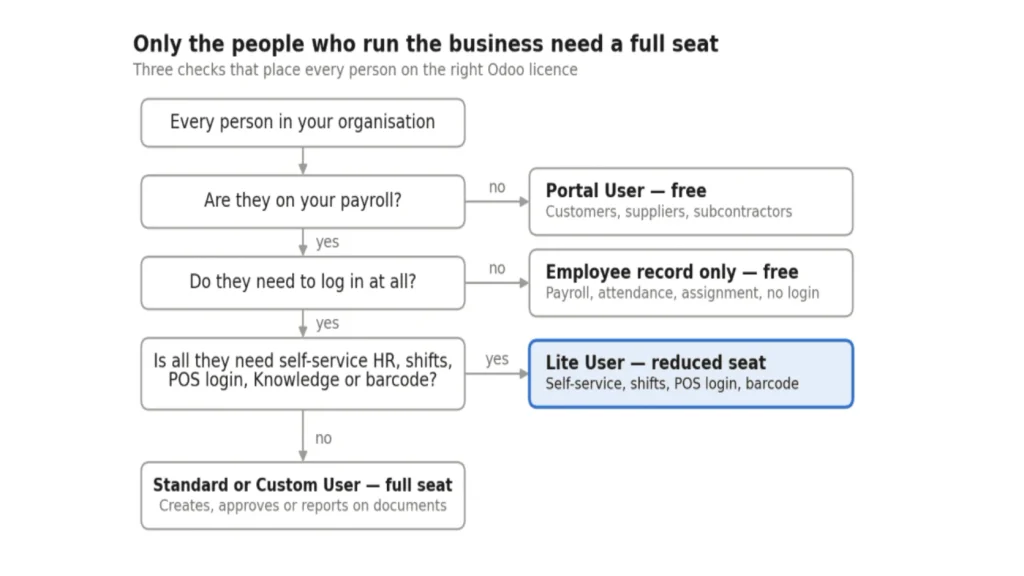
Anyone who fails the last check needs a full seat. Be honest at that step. A supervisor who approves his team’s overtime, or a storekeeper who creates products, is a Standard User no matter how much you would prefer otherwise.
Run this against roles, not individuals. A company with 300 people usually has fewer than 30 distinct roles, and the answer for one storekeeper is the answer for all of them.
How to set it up
Menu labels shift between Odoo releases, so treat the paths below as the route rather than the exact wording. The sequence holds across recent versions.
Creating an employee with no application access
- Open the Employees app and create a new employee record.
- Fill in the work information, department, manager and job position.
- In the HR Settings tab, leave the related user field empty. This is the whole trick — an employee with no linked user is not a seat.
- Add the contract, salary structure and bank details if you run payroll.
- Assign a badge or PIN if they will use attendance kiosk or POS identification.
That person now exists everywhere they need to exist and can log in nowhere.
Creating a Lite User
- Go to Settings → Users & Companies → Users and create a new user.
- Set the login email and the user type to the internal Litetier.
- Grant only the employee-level rights the person genuinely needs — self-service HR, their planning, and nothing beyond it.
- Link the user to their existing employee record so that HR data, attendance and payroll stay on one identity rather than two.
- Save and verify by logging in as that user. Do not assume; check what they can actually see.
Enabling a cashier in Point of Sale
- In the POS configuration, switch on the setting that allows employees to identify themselves in a session.
- Add the relevant employees to the allowed list for that point of sale.
- Set each cashier’s PIN or badge on their employee record.
- Cashiers now identify themselves per transaction, so sales and cash handling are attributable per person.
Enabling barcode operations
- Install and configure the Barcode application, with your operation types and locations defined by a full user.
- Grant the Lite User the barcode operator right.
- Confirm they can scan and validate transfers, and confirm they cannot create a product or launch an inventory adjustment.
The verification step people skip
Before go-live, log in as one person from each tier and try to break the boundary. Attempt to open Accounting as a Lite User. Attempt to create a product from the barcode screen. Attempt to approve your own leave request.
Ten minutes of this will tell you more about your access design than any amount of reviewing checkboxes in the settings screen, and it is far cheaper to discover a gap in testing than in an audit.
Eight mistakes that quietly inflate your Odoobill
1. Giving everyone a full seat “to avoid complications”. The single most expensive sentence in ERP implementation. It is not a shortcut; it is a decision to pay several times more, forever, in exchange for skipping one afternoon of analysis.
2. Counting employees instead of seats when you budget. A 400-person company does not need a 400-seat quotation. Anyone who quotes you that way has not asked what your people do.
3. Confusing Portal with Lite. External parties are free. If you are paying anything for a customer’s access, something is configured wrong.
4. Granting one extra application to a Lite User. A single business app added to a Lite User moves them into full-user billing. Do this across thirty people over six months and you will not notice until renewal.
5. Sharing logins. When a Lite tier is not used properly, the workaround is always the same: one full login shared across a shift. This destroys attribution, breaks your audit trail, makes attendance and POS data meaningless, and generally breaches your licence terms.
6. Expecting Lite Users to approve things. Lite Users submit. Supervisors who approve overtime, sign off expenses or authorise stock movements need a full seat. Budget for them explicitly rather than discovering them in week three.
7. Never auditing again. Headcount churns. People are promoted, roles change, staff leave and their accounts stay active. Seat counts drift upward and nobody notices until renewal. Audit quarterly.
8. Designing the licence structure after go-live. Retrofitting access tiers means re-training, re-testing and often re-migrating who owns which records. It costs several times what the same analysis costs during scoping. Do it before you sign, not after.
Does this apply to Odoo Community and on-premise?
This trips people up, so it is worth stating plainly.
Odoo Community is free and has no per-user licence fee at all. There is no Lite tier to buy, because there is nothing to buy. If you are running Community, the licensing argument in this article does not apply to you.
But the design argument still does, and arguably more so. Community gives you no commercial guardrail. Nothing stops you granting everyone everything, and in practice that is exactly what under-supervised Community deployments do. The result is the data quality problem described earlier, arriving on schedule at around month twelve.
If you run Community, build the same tiering manually through groups and record rules. Give floor staff employee records with no user account. Restrict self-service users to their own data. You will not save licence money because you were not spending any, but you will save the reconciliation work that a badly governed database generates.
Odoo Enterprise on-premise is licensed per user, so the tier structure and its economics apply as described.
Odoo Online and Odoo.sh are licensed per user, so the same applies.
One more consideration specific to Pakistan: if you are weighing Community against Enterprise on cost, do the comparison on total cost rather than licence cost alone. Community shifts the expense from licence fees to hosting, maintenance, upgrades and the developer time that Enterprise’s supported modules would otherwise cover. Either answer can be right. The one that is always wrong is choosing Community because the licence is free and then discovering the maintenance bill.
Frequently asked questions
What is a Lite User in Odoo?
A Lite User is a reduced-cost Odoo licence for internal staff who need either no login at all or only restricted, self-service access. It covers HR self-service, personal planning and worksheets, connecting as an employee in a POS session, read-only Knowledge, and barcode operations in the warehouse.
Is a Lite User free?
No. A Lite User is a paid seat at a reduced rate. What is free is an employee record with no linked user account — that person exists in HR, payroll and attendance without being billable.
What is the difference between a Lite User and a Light User?
Nothing. They are two spellings of the same licence tier.
Can a Lite User create a sales order?
No. Sales is a core business application and sits entirely outside the Lite tier, along with Purchase, Project and Accounting.
Can a Lite User approve leave requests?
No. A Lite User submits their own leave request. Approval is a manager function and requires a full user seat.
Can a Lite User use Point of Sale?
Yes, as a cashier. They can connect as an employee in an open POS session and ring up sales under their own identity. They cannot configure the point of sale or act as a session manager.
Can a Lite User manage inventory?
Only through barcode scanning — picking, receipts, internal transfers and packing. They cannot create products, run inventory adjustments or configure warehouse settings.
What is the difference between a Lite User and a Portal User?
A Lite User is internal — your own employee, on your payroll, with restricted access. A Portal User is external — a customer, supplier or subcontractor viewing their own documents. Portal access is free; Lite access is a paid seat.
Do employees without a login cost anything?
No. An employee record with no linked user account is not a billable seat. This is how most floor staff, labour and drivers should be configured.
Can I upgrade a Lite User to a Standard User later?
Yes. When someone’s role changes, you change their user type and access rights. Their history, employee record and existing data stay intact.
How many Lite Users can I have?
There is no structural cap. The tier is designed for deployment at scale — hundreds of Lite seats in a single database is a normal pattern, not an edge case.
Does the Lite tier exist in Odoo Community?
No, because Community has no per-user licence fee. The access-restriction pattern is still worth building manually through groups and record rules.
How do I work out how many full seats I actually need?
Count the people who create, approve, or report on business documents — quotations, purchase orders, invoices, manufacturing orders, project tasks. In most operating businesses that is 5% to 20% of total headcount. Everyone else belongs on Lite or on a free employee record.
What to do next
Run a seat audit before you talk to anyone about price. It takes an afternoon and it is the highest-return hour in the whole evaluation.
Open a spreadsheet. List every role in your company — not every person, every role. Against each one, write what that role actually needs to do in the system. Then apply the three checks above and mark the tier.
Add up the columns. That total is your real Odoo requirement, and it is almost always a fraction of your headcount.
Walk into the conversation with that number and two things change. You stop being quoted on headcount. And you find out quickly whether the person opposite you understands Odoo licensing or is simply multiplying.
Tagged with :